


Bulk document upload
Designing a seamless bulk upload experience that reduced document processing time by 2.5 minutes per file while handling complex edge cases and failure states.
Project
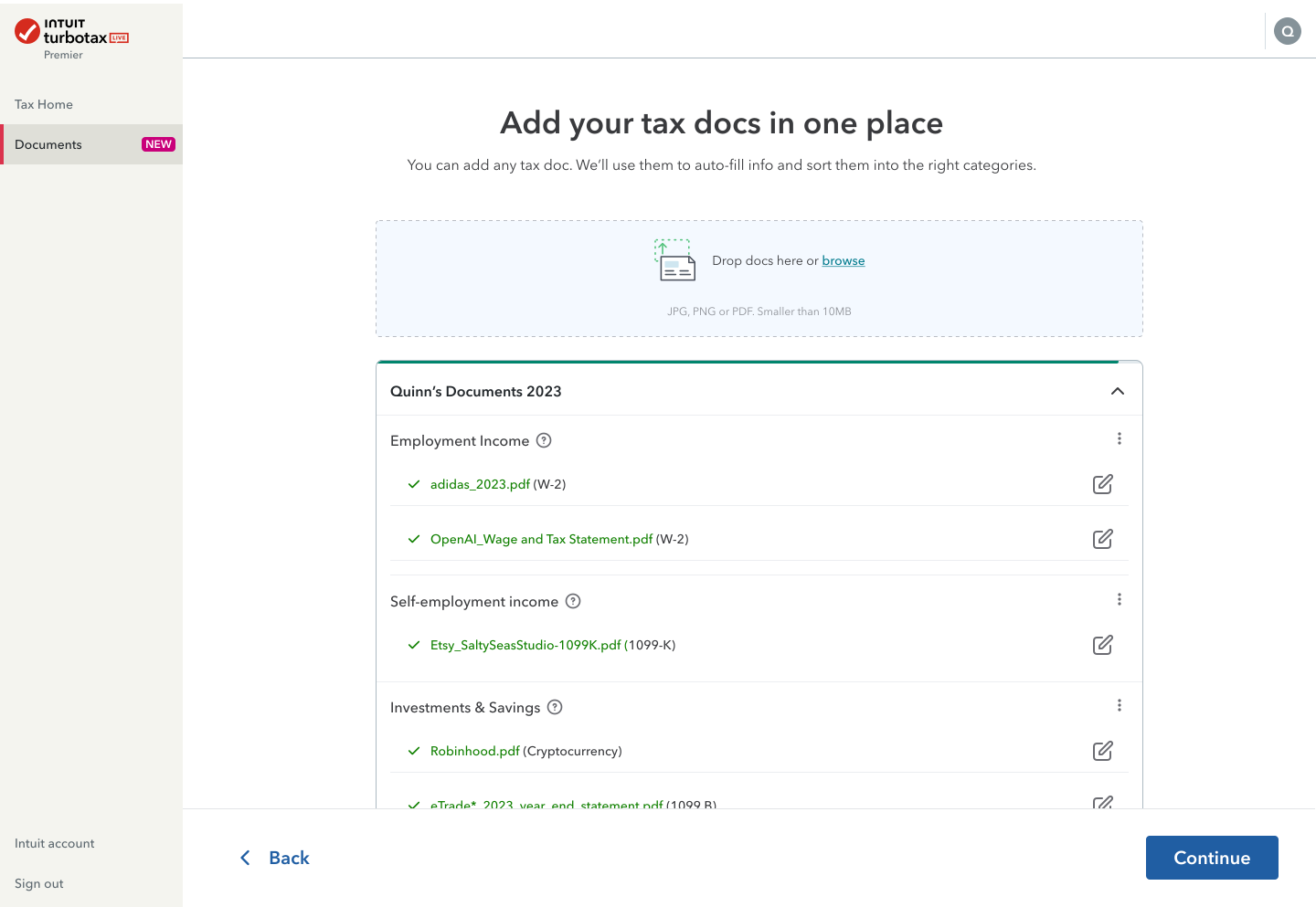
Bulk documents upload
Role
Product design, UX/UI, strategy
Client
Intuit TurboTax
2.5
Min per doc time saved
97
Error reduction
24
Conversion uplift
95
Classification accuracy
Problem & opportunity
Current Reality
- Users were uncertain about what documents to gather before beginning, causing interruptions midway through tax prep
- Many were unaware of TurboTax’s document import capabilities and ended up converting or scanning unnecessarily
- Uploading documents one at a time was tedious, error-prone, and discouraged users from completing the process in one session
- High friction in the document stage led to support tickets, drop-offs, and reduced trust in the system
The Goal
How might we help customers get organized before they start, and support robust handling of edge and failure states during bulk upload?
My role and approach
I drove the full product design lifecycle, from discovery and prototyping through launch and iteration, collaborating tightly with engineering, ML/data, and product strategy teams.
Key responsibilities
- Research design and framing
- Flow & interaction design
- Error state and edge-case modeling
- Cross-functional alignment (ML/data and infrastructure)
- Measurement and iteration post-launch

Design philosophy
To design a resilient system, we created a list of failure or “less-than-perfect” states, each requiring its own UI path, messaging, and fallback logic.
Ideal State Definition : 100% of documents are uploaded, classified, and applied to the return without manual correction.
Team collaboration & edge case planning
As part of our early discovery and planning phase, we facilitated a focused Bulk Upload Edge Case Brainstorming Workshop using FigJam. The goal was to collaboratively identify real-world failure points, anticipate technical limitations, and explore solutions ranging from practical to imaginative.
We brought together a cross-functional team of six:
- 2 designers (myself + a visual systems designer)
- 1 frontend engineer
- 1 product manager
- 1 researcher
- 1 strategy partner

Edge states & design logic
Edge & failure states to handle
- Single document upload failure
- All uploads failure (none succeeded)
- Extraction failure (file accepted, but parsing failed)
- Document type supported but not classified (“Other docs”)
- Document applied with low classification confidence (needs review)
Edge Case Distribution

Design & strategy decisions
Challenge
Unsupported format
Solution
Pre-upload validation to reject invalid file types (e.g. “Only PDF, PNG, JPG accepted”)
Exceed file size
Enforce size limits up front, support chunked or resumable uploads to avoid full failures
Duplicate data
Deduplication logic and UI warnings
Corrupted or unreadable file
Flag parsing failure early; show “unreadable file” message with remediation
Partial extraction
Show extracted fields vs missing ones; let user correct inline
Low confidence classification
Show “low confidence, please review” prompt; allow user override
Prototyping happy path & edge case error states


- Designed clear file format guidelines and size limitations upfront
- Created visual feedback for incompatible file formats before upload attempts
- Implemented batch validation to identify potential issues before processing
- Added file size monitoring with automatic compression options for large files

- Developed a real-time processing status indicator showing individual document progress
- Created clear messaging for partially processed documents with data quality issues
- Designed recovery paths for corrupted files and server-side errors
- Implemented detection and alerts for duplicate document uploads

- Highlighted incomplete or non-standard data extraction for user verification
- Provided side-by-side comparison between original document and extracted data
- Designed intuitive correction interfaces for partially successful extractions
- Created confidence indicators for AI-classified fields requiring human verification

- Implemented final validation checks before data integration
- Provided summary reports of successful, partially successful, and failed documents
- Created clear guidance for resolving remaining issues
- Designed seamless pathways to manually enter data when automated extraction failed
Results & impact
Business & Strategic Benefits
- Faster progression through tax prep, especially for power users
- Lower support burden around document upload errors
- Increased user confidence, reducing drop-offs
- Foundation established for further automation
- Strengthened brand perception of robustness & intelligence
Post-launch Learnings
- Edge states are inevitable, design them early
- Allowing partial success + correction is often more user-friendly than strict “all or nothing”
- Clear error messaging (what failed, and how to fix) is as crucial as UI design
- Infrastructure (backend, scaling, retry logic) must align tightly with front-end capability
Reflections & next phases
What I'd Push Forward Next
- Live / background processing:
Letting users move ahead while extraction runs in background - Smarter merging & deduplication:
Merging different document scans into a unified form view - Cross-product reuse:
Applying import logic beyond tax docs (e.g. financial statements, receipts) - Foreign language detection:
Auto-detect language, warn gently, offer extraction with disclaimer. - Predictive document reminders:
Suggest “You may be missing a 1098” based on prior years.
Challenges & Trade-offs
- Over-handling rare error cases adds UI complexity, we needed to balance coverage vs simplicity
- ML confidence thresholds had to be tuned carefully to avoid misclassifications
- Infrastructure demands (throughput, retries, scaling) were heavy, we prioritized reliability
- Time & budget constraints meant some fallback UI states were deprioritized in V1